


September: See the Hebrew and Greek behind the words
Tap any marked word to see the original Hebrew or Greek. Highlight commentary the way you highlight verses. Every book now has its own painting. And Protos is on Google Play.
This was our biggest month so far, and most of it changes what you see when you read.
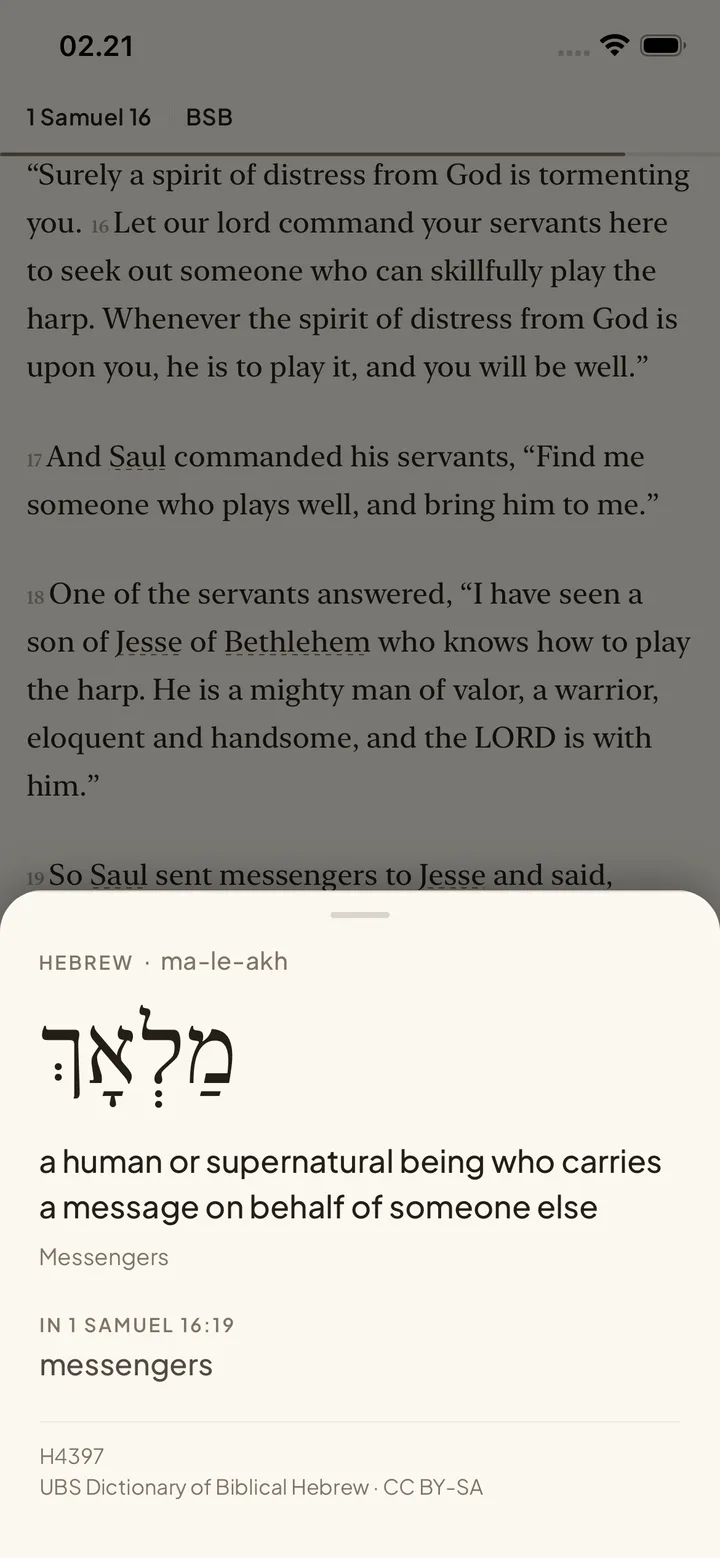
Tap a word, see the original
Every English translation makes choices for you. Sometimes one English word stands in for several Hebrew ones, and sometimes the original carries more than the English can.
Turn on Original Language from the top of the reader and tap a marked word. You get the Hebrew or Greek word, how to say it, and what it means in that verse. You see the meaning that fits where you are, instead of a long list to pick from.
Know who and where you're reading about
Study Mode marks the people, places and key words in the chapter. Tap one and a card tells you who they were or where it is, with a picture when we have one. Some people used to show a photo of their tomb. 79 of them now have a portrait instead.
Highlight the commentary too
You could already highlight verses. Now you can tap any sentence in the commentary and highlight or underline it. Colors and underlines can stack on the same sentence. Your commentary marks show up in the Highlights tab next to your verse highlights, and they sync across your devices.
A painting for every book
All 66 books now have their own artwork. You'll see it when you pick a chapter and at the top of each book's introduction. Each one shows a scene people know the book for.

Protos is on Android
Protos is now on Google Play. If you've been waiting on the Android waitlist, it's ready. Sign in with the same account and your notes and highlights come with you.
Also improved
- Long press a verse to open a bar with everything you can do with it. The walkthrough for new readers now teaches this.
- Your text size and reading preferences now apply to guides and the library too.
- iOS no longer cuts off the last line of a paragraph.
- On Android, highlights no longer break the layout of a chapter.
- The first few pictures in a chapter load ahead of time, so you don't wait for them.
- Book introductions open directly, without leaving the chapter you're in.
- Better layouts on iPad, including sheets and the paywall.
- You can invite a friend from Settings and see when they start reading.


